12 Abstract Patterns for Creative Flexibility
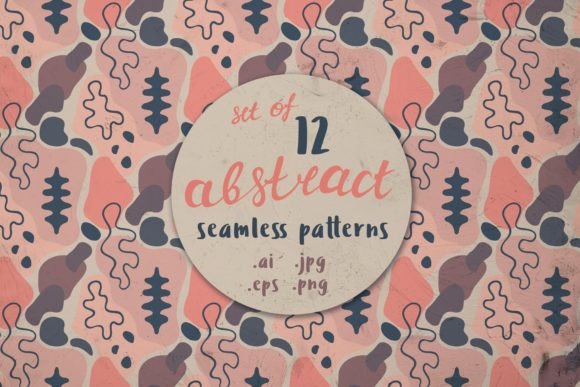
Twelve abstract patterns—each a seamless, vector-based design built from expressive shapes—form a versatile toolkit for visual work. They’re not just static images. These are living assets: fully editable in Adobe Illustrator, scalable without loss, and delivered in multiple formats to suit real-world workflows. You’ll receive 12 .EPS files, 12 .AI files, 12 high-resolution .JPGs (5000×5000 px), and 12 transparent-background .PNGs at the same size. That means no guessing whether a pattern will hold up on a billboard, a Shopify banner, or a classroom handout.
Why “Abstract” Matters—And Why “12” Is Thoughtful
Abstract patterns avoid literal references—no florals, geometrics, or motifs tied to a single era or trend. Instead, they use rhythm, contrast, scale, and negative space to evoke mood, movement, or texture. That neutrality is their strength: a designer can tint one cool blue for a fintech app interface, warm it up for a wellness brand, or layer it subtly behind text in an academic presentation. The set includes 12 distinct variations—not too few to feel limited, not so many that choosing becomes overwhelming. Each stands alone, yet they harmonize when used together across touchpoints.
For Beginners Learning Design Tools
If you’re new to Illustrator—or even new to vector editing—these patterns offer low-risk, high-reward practice. Open any .AI file, select a shape with the Direct Selection Tool (A), and change its fill color in seconds. Try resizing a group using the Scale Tool (S) while holding Shift to maintain proportions. No plugins, no tutorials required. You’ll build confidence in core functions: layers, grouping, path editing, and export settings—all while making something visually meaningful. Unlike raster textures or Photoshop brushes, these won’t pixelate when zoomed or printed, so early experiments stay usable long after your first project.
For Educators and Presenters
Teachers, trainers, and workshop facilitators often need clean, non-distracting backgrounds for slides or handouts. A subtle abstract pattern adds depth without competing with content—especially useful when projecting in varied lighting or sharing PDFs with students who use screen readers (since patterns here are purely decorative, not functional). One educator uses the lightest pattern as a soft background for weekly reflection prompts; another applies a bolder version to section dividers in a digital course syllabus. Because all files include transparent PNGs, they drop easily into Google Slides, Canva, or PowerPoint without white borders or compression artifacts.
For Freelancers and Small Business Owners
Time is rarely abundant—and consistency matters. A freelance branding consultant might apply the same base pattern across a client’s social media banners, pitch deck, and invoice footer, adjusting only hue and opacity to match brand guidelines. A boutique owner could license one pattern for limited-run packaging, then repurpose the same asset for Instagram Stories and email headers. Since every file is vector-based and commercially safe (no third-party fonts or embedded stock), there’s no legal ambiguity when reusing across platforms—or reselling as part of a larger deliverable.
For Marketers and Content Creators
Marketing assets wear out fast. What feels fresh in January may look dated by April—unless the foundation is intentionally timeless. These 12 Abstract Patterns avoid trends like gradients, glassmorphism, or hyper-realism. Instead, they rely on composition and balance—qualities that age gracefully. A newsletter designer might use a mid-tone pattern as a section separator between headlines and body copy. A podcast producer could animate one pattern as a looping background for video intros, scaling it smoothly across devices thanks to its vector origin. And because JPG and PNG versions are pre-rendered at 5000×5000 px, they load quickly on modern CMS platforms—even when cropped tightly for thumbnails or featured images.
For Hobbyists and Personal Project Builders
You don’t need a client brief to benefit from thoughtful design resources. Maybe you’re designing custom wrapping paper for a friend’s wedding, updating your personal blog’s header, or creating themed printable planners. These patterns give structure without dictating style. Change colors to match seasonal palettes. Overlay them with handwritten typography. Use clipping masks in Illustrator to confine a pattern to a heart-shaped frame for a greeting card. The flexibility supports play—not pressure. And since all 12 come in identical formats, swapping one for another mid-project takes seconds, not hours.
What Makes This Set Reliable—Not Just Pretty
Reliability isn’t flashy—but it’s what keeps projects moving. These patterns were built with practical constraints in mind: no stray anchor points, no hidden layers, no embedded raster images. Every .AI file opens cleanly in Illustrator CC 2019 and later. EPS versions retain editability in older software or across platforms (e.g., Affinity Designer via import). JPG and PNG exports use sRGB color space, ensuring consistent appearance on screens—no surprise shifts when shared via email or viewed on mobile.
Quality shows in quiet ways. The 5000×5000 px raster files mean you can print a 24×36" poster at 300 DPI and still retain crisp edges. Transparency in PNGs allows true layering over photos or gradients—no matte fringing. And because shapes are constructed with smooth Bézier curves—not traced scans or auto-generated vectors—they respond predictably to stroke adjustments, effects, or Boolean operations.
How to Know If This Fits Your Needs
Ask yourself:
- You’re editing in Illustrator regularly? Then the .AI and .EPS files let you adapt patterns to exact specifications—changing spacing, adding strokes, or isolating elements for animation.
- You mostly use Canva, Figma, or PowerPoint? The high-res PNGs and JPGs work immediately—just drag, drop, and resize. No installation, no compatibility checks.
- You value long-term reuse? These aren’t one-off downloads. They’re building blocks—like having 12 well-cut fabric swatches you can dye, stitch, or layer differently each time.
- You’re evaluating cost versus effort? Compare the time spent building a custom seamless pattern from scratch (hours, trial-and-error) versus opening a ready-to-tweak file (minutes, predictable results).
There’s no universal “best” pattern set—only the right one for where you are now, what you’re making, and how much control you need. These 12 Abstract Patterns meet people where they are: whether you’re sketching your first logo, refreshing a decade-old website, or helping students understand visual hierarchy through hands-on layout exercises. They don’t replace skill—but they do remove friction between idea and execution.