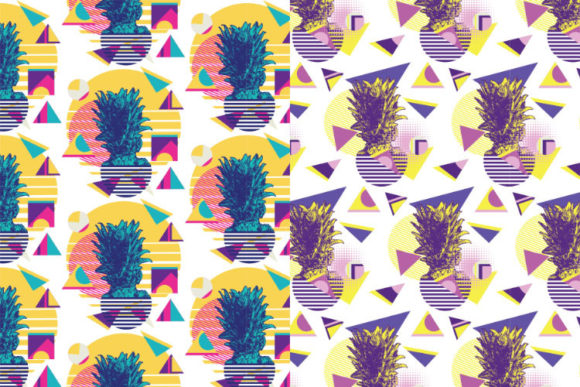
4 Vector Retro Patterns with Pineapple
Retro design isn’t just nostalgia—it’s a functional aesthetic choice that signals energy, playfulness, and confident visual storytelling. The 4 Vector Retro Patterns with Pineapple pack delivers exactly that: four cohesive, editable patterns rooted in Memphis-style geometry—bold lines, asymmetric shapes, high-contrast color blocking—and anchored by the unmistakable tropical motif of the pineapple. Each pattern balances structure and spontaneity: sharp triangles meet wavy stripes; concentric circles intersect with zigzag borders; checkerboards dissolve into organic pineapple silhouettes. This isn’t decorative filler. It’s a production-ready asset set built for real workflows—whether you’re designing a limited-edition product label, refreshing a brand’s social media templates, or building a presentation deck that needs personality without clutter.
How These Patterns Fit Into Your Creative Process
You don’t wait until final design to consider pattern. With 4 Vector Retro Patterns with Pineapple, integration starts early—often during moodboarding or style guide development. When you’re aligning visual direction with tone (e.g., “vibrant but intentional,” “fun but professional”), these patterns serve as concrete anchors. Drop one into a Figma or Adobe XD wireframe to test how texture affects hierarchy. Use the Illustrator AI file to scale seamlessly across packaging mockups—no pixelation, no rework. Because they’re vector-based, you can adjust stroke weight, recolor on-the-fly using Global Swatches, or isolate individual elements (like a single pineapple icon) for standalone use in icons or UI components.
During execution, the dual-format delivery matters. The AI editable vector pattern file lets designers tweak spacing, rotation, or tile repeat behavior directly in Illustrator—ideal when adapting a pattern to fit an irregular-shaped label or custom die-cut. Meanwhile, the PSD PAT file enables non-vector users (marketers, educators, small business owners) to apply the same pattern instantly in Photoshop layers—no tracing, no rasterization. You can lock transparency, overlay text with blending modes, or mask portions cleanly. And because each pattern is also delivered as a PNG with transparent background, it drops effortlessly into Canva, PowerPoint, Notion, or even email HTML templates—no background cleanup required.
Workflow Integration Across Tools and Teams
These patterns work best when treated as shared language—not just assets. A freelance designer might send the AI file to a client for approval, then hand off the PSD and PNGs to their web developer for CSS background-image implementation or SVG embedding. An educator creating workshop handouts can paste the PNG into Google Slides, resize freely, and know the pineapple motif stays crisp at any dimension. A small business owner launching a summer product line uses the same pattern across Instagram Stories (PNG), Shopify banner (PSD layer), and printed hang tags (AI + print-ready PDF).
Compatibility is baked in. All files follow standard naming conventions (pineapple-memphis-stripes.ai, pineapple-geo-grid.psd, etc.) and are organized in a flat, intuitive folder structure—no nested subfolders, no version numbers buried in filenames. That means less time hunting, more time iterating. If your team uses cloud storage like Dropbox or Google Drive, drop the entire zip into a shared “Brand Assets” folder. Add a brief README.txt (not included—but recommended) noting color palettes used (Pantone references included in the AI swatches) and suggested use cases per pattern. That turns a simple download into a maintainable part of your asset system.
Practical Implementation Tips
- Start with contrast testing: Before applying any pattern to a layout, place it over your intended background color or photo. Memphis styles rely on strong value shifts—what reads clearly on white may vanish on light yellow. Use the PNGs to preview quickly in your native app.
- Leverage the pineapple as a focal anchor: In presentations or pitch decks, use one pattern as a full-slide background, then pull out a single pineapple shape (from the AI file) as a bullet point icon or section divider. Consistency emerges from repetition—not uniformity.
- Modify, don’t replace: Don’t feel bound to use the patterns as-is. In Illustrator, ungroup the tile and delete or recolor non-essential shapes—say, mute the neon pink triangles while keeping the bold black outlines and pineapple forms. That maintains the Memphis spirit while tailoring intensity to your audience.
- Scale intentionally: These patterns thrive at medium-to-large scale. Avoid shrinking them below 10% in layout view unless you’re aiming for subtle texture. For business cards or favicons, use isolated pineapple elements instead of the full repeat.
Long-Term Usability and Quality Control
Because these are vector-first assets, longevity isn’t theoretical—it’s structural. Unlike raster patterns that degrade with each export or resize, the AI file retains infinite scalability. That means the same pattern used in a 2024 Instagram post works equally well in a 2027 trade show banner—no re-purchasing, no upscaling artifacts. The PSD and PNG files are exported at 300 PPI (print-ready) and 72 PPI (screen-optimized), respectively, with alpha channels preserved. No guesswork, no manual transparency fixes.
Quality control begins with organization. Keep the original zip archived in your master asset library—even after extracting. That ensures version integrity if you ever need to re-download or verify source fidelity. When sharing with contractors or agencies, include all three formats (AI, PSD, PNG) every time—don’t assume they’ll convert or extract what they need. Reducing friction here prevents misaligned outputs and revision loops.
Consistency over time comes from disciplined reuse—not rigid rules. One team might adopt the “Pineapple Grid” pattern exclusively for internal training materials, while reserving “Tropical Zigzag” for customer-facing campaigns. Another might rotate patterns quarterly to keep brand expression fresh without overhauling core identity. The key is intentionality: choose a pattern based on its functional role (e.g., “This one guides the eye vertically—perfect for a step-by-step process graphic”) rather than only its visual appeal.
Real-World Use Cases Beyond Decoration
A blogger building a downloadable productivity planner inserts the “Memphis Pineapple Dots” pattern as a subtle header background—adding warmth without competing with handwritten notes. A podcast host overlays the “Geo Pineapple Stripe” PNG onto video thumbnails in CapCut, then exports with consistent framing across 50+ episodes. A university department uses the AI file to generate custom lab coat embroidery patterns—scaling the repeat to match sleeve width, then exporting to their digitizing software.
Even in data visualization, these patterns earn their place. Replace flat fills in bar charts or pie segments with the pineapple motifs—using the PSD’s layer masks to constrain shape to chart boundaries. It adds visual distinction without sacrificing clarity, especially in presentations where accessibility (color contrast, pattern recognition) matters.
The 4 Vector Retro Patterns with Pineapple pack doesn’t ask you to change how you work. It asks you to notice where texture, rhythm, and thematic resonance already matter—and gives you precise, adaptable tools to strengthen those moments. Whether you’re sketching on paper, coding a landing page, or prepping a client presentation, these patterns integrate where they add value—not where they fill space.